
The Cube is not one button. This page tells you what each operation consumes, when it unlocks, and which items should never go into auto-fill.
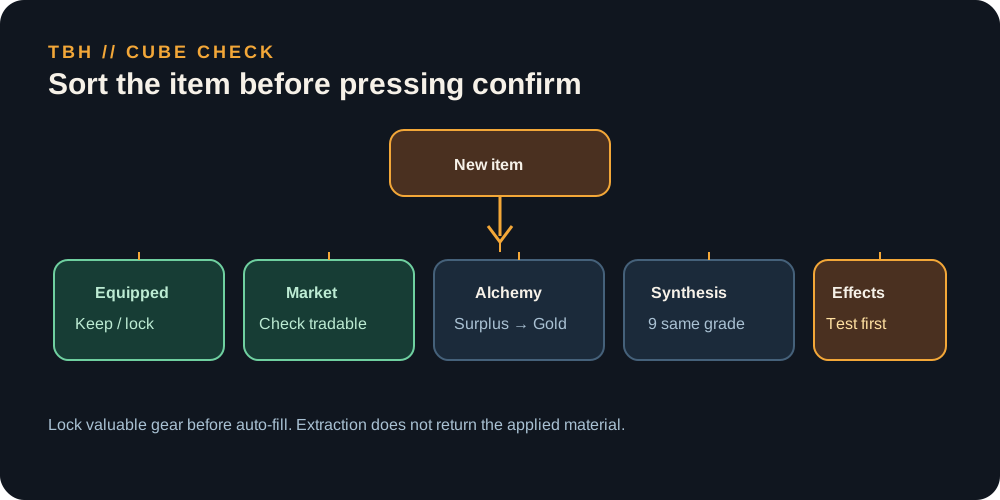
Keep equipment that supports the active formation; use Alchemy for true surplus, Synthesis only when all nine inputs are expendable, and treat permanent-effect operations as irreversible decisions.
TBH Hero-dric Cube: a decision guide, not a button list
The Cube is TBH’s item economy. It gives you a way to turn drops into Gold, move up gear grades, target a slot, and add or remove permanent item effects. The useful question is not “what does this tab do?” but “what am I giving up by pressing confirm?”
All eight operations and when they unlock
| Operation | Unlock | Cost shown by current database | Use it for |
|---|---|---|---|
| Synthesis | Default | — | 9 same-grade items in one category → one higher-grade result |
| Alchemy | Cube Lv 1 | 10 Gold | Surplus items → Gold + Cube EXP |
| Crafting | Cube Lv 5 | 100 Gold | A random item in a selected slot/category |
| Decoration | Cube Lv 8 | 300 Gold | Add a special stat/material effect |
| Extraction | Cube Lv 10 | 1,000 Gold | Remove an applied effect; material is not returned |
| Engraving | Cube Lv 15 | 1,000 Gold | Add an engraving effect |
| Offering | Cube Lv 20 | 3,000 Gold | Trade commemorative coins for a random reward |
| Inscription | Cube Lv 25 | 10,000 Gold | Add an inscription effect |
The unlock levels and operation names come from a community-datamined database. The official Steam page confirms the Cube system, but does not publish the full recipe table.
The keep / alchemize / synthesize rule
Before opening the Cube, sort every item into one of four piles:
| Pile | Keep it when… | Cube action |
|---|---|---|
| Equipped | a hero is wearing it | never auto-fill |
| Backup | it is the only spare for an active role or a better base grade | keep until the replacement is tested |
| Market candidate | it is tradable and high grade, with no applied effects | check the market before consuming |
| Surplus | it is a duplicate you cannot equip, sell, or use in a planned recipe | Alchemy or Synthesis |
Lock valuable items before using auto-fill. The community guide documents Alt + Left Click; confirm the lock icon in your client before trusting the shortcut.
Synthesis: exact rules that matter
Synthesis takes nine items of the same grade and the same category. Gear, Accessories, and Materials cannot be mixed. The result is rolled around the input level range and can be a higher grade; at high grades, a same-grade result is possible.
| Inputs | Current datamined result rule |
|---|---|
| 9 Common | 95% Uncommon; 4.8% Rare great success |
| 9 Uncommon | 96% Rare; 3.8% Legendary great success |
| 9 Rare | 98% Legendary; 2.4% Immortal great success |
| 9 Legendary | 99% Immortal; 0.99% Arcana great success |
| 9 Immortal | 50% Immortal; 50% Arcana; 0.25% Beyond great success |
Below Immortal, the normal result grades up. From Immortal upward, a synthesis can fail into the same grade. That is why “nine items = guaranteed upgrade” is bad advice for late-game gear.
Alchemy: the safe early Gold button
Alchemy consumes 1–9 items and returns Gold plus Cube EXP. Current database base Gold values are:
| Grade | Base Gold |
|---|---|
| Common | 10 |
| Uncommon | 30 |
| Rare | 90 |
| Legendary | 270 |
| Immortal | 810 |
| Arcana | 2,592 |
Rune and pet bonuses can increase the actual payout. Equipped, blocked, and reserved items should not be treated as disposable. If the auto-fill list contains one item you cannot replace, cancel and lock it.
Crafting: target a slot, accept randomness
Crafting lets you choose a gear slot—main weapon, off-hand, helmet, armor, gloves, boots, or accessory—and returns a random item from the selected tier. It does not promise a specific name, grade, or perfect stat line. Use it when you can name the missing slot; do not use it as a blind “upgrade” button.
Permanent effects: wait for the base item
Decoration, Engraving, and Inscription spend materials on an item. Extraction removes an applied effect, but the material used to add the effect is not returned in current data. Therefore:
- Equip the base item.
- Test it for several stages.
- Confirm the class and role you want to keep.
- Apply the effect.
- Extract only when the replacement is demonstrably better.
Offering is a random reward exchange. It may be useful for excess commemorative coins, but it is not a reliable fix for a progression wall.
Cube-level priorities
Every item consumed by Synthesis, Alchemy, Crafting, and Offering grants Cube EXP; Decoration, Engraving, Inscription, and Extraction do not. Higher-grade, higher-level materials give more EXP, but level mismatch reduces the gain. This makes Alchemy a legitimate early leveling route when the items are already surplus—not a reason to destroy your active set.
Sources & evidenceOpen the references used for this page
- TBH Wiki Cube overview — operation unlock levels, costs, Cube EXP and database formulas.
- TBH Wiki Synthesis — 9-item category rules, grade odds and high-grade failure behavior.
- TBH Wiki Alchemy — base Gold values and item restrictions.
- Official Steam listing — official high-level Cube description.
The datamined pages are independent fan references. Use them for exact tables, then check the live Cube tooltip after a patch.
QUICK ANSWERS
Questions players ask next
Should I use Synthesis early in TBH?
Usually no. Save useful gear and Gold for the Rune Tree until your inventory contains genuine surplus. Synthesis becomes more attractive when duplicates are overflowing.
What does Alchemy do in TBH?
Alchemy consumes 1–9 items and returns Gold plus Cube EXP. Lock valuable items before auto-fill because equipped, blocked, and reserved items are treated differently from ordinary inventory gear.
HELP SHAPE THE NEXT UPDATE
Missing an answer—or found something outdated?
Send the exact game problem, platform, and version. Corrections are reviewed before expansion requests.